Best typing programs for kids compared
There is no single best typing program: the best one is the one that fits your child. So we put seven programs side by side on the same points, from price and certificate to keyboard and ads, and say for each situation which one fits best.
This comparison is made by Typcoon, and Typcoon is in it. We have tried to be fair: only facts we found in a source, with the source next to them, and we say when another program is the better fit. Is something out of date? Email contact@typcoon.com and we will fix it. Other programs' names are trademarks of their owners; Typcoon is not affiliated with them.
How we compared
We looked at what parents and teachers ask us most: what does it cost, do you pay once or every month, what age is it for, is there a certificate, does it work with your keyboard, are there ads, do you need an account, and does it work on a Chromebook.
Every fact comes from the providers' own sites (or, where noted, a public body) and is listed under Sources at the bottom. Where we were not sure, we left the cell open. Looking for free games first? Read free typing games for kids.
The seven programs side by side
| Program | Price for parents | One-off or subscription | Age | Game or course | Certificate | Keyboards | Ads | Account needed | Chromebook | Languages |
|---|---|---|---|---|---|---|---|---|---|---|
| Typcoonours | Free to start (the Harbour, then 3 more missions). Full version €19.95 per child source | One-off, no subscription (valid for a year, up to and including the typing diploma) | 8 to 14 | A game with a complete typing course inside | Typing diploma: at least 95% accuracy and 100 keys per minute | 8 layouts: US and Dutch QWERTY, Belgian and French AZERTY, German and Swiss QWERTZ, Spanish and Latin American | No | No; a parent email address is optional. Schools: a class code and a pupil code, no email | Yes, in the browser | English, Dutch, German, French, Spanish |
| TypingClubedclub | Free with ads; ad-free Premium as a yearly subscription source | Free, or a yearly subscription | – | Short lessons with games and videos | – | Layout can be chosen in the settings | Yes, in the free version | Not needed to practice; needed to save progress | Yes, in the browser | Including English, Spanish and German |
| Typing.com | Free with ads; PLUS without ads is paid (price on their site) source | Free, or a PLUS subscription | K–12 and adults | Lessons, tests and games | Yes, per unit | – | Yes, in the free version | – | Yes, in the browser | English, Spanish |
| Dance Mat TypingBBC Bitesize | Free source | Free | 7 to 11 | Game-style lessons in 4 levels | – | – | – | – | – | English |
| Nitro Type | Free with ads; Nitro Gold (paid subscription) removes the ads source | Free, or a Gold subscription | – | Racing game against other typists | – | – | Yes, without Gold | – | Yes, in the browser | English |
| TypeTastic | Free version with ads; paid editions as a yearly subscription source | Free, or a yearly subscription | K–12 | Typing games and activities | – | – | Yes, in the free version | – | Yes, in the browser | – |
| Touch-type Read and SpellTTRS | Paid subscription, monthly or yearly (price on their site) source | Subscription, renews automatically (cancel or pause any time) | – | Multisensory course: typing, reading and spelling | – | – | – | Yes | – | English |
– = we could not check this in a source, so we leave it open. Prices as the provider listed them on 29 October 2026; offers change, so always check the provider's own site.
The programs in short
Typcoon
A game in which your child types a dark city back on, with a typing course underneath that adapts with every key. Parents follow progress on their own phone. Free to start; the full version is paid once per child. Playing through school? See For schools. Keep in mind: it is a game, not a course with a teacher, and it needs a computer or laptop with a keyboard.
TypingClub
A large, free, structured course in the browser, with a dashboard for schools. Lessons are short and build up step by step. The free version shows ads; a yearly Premium subscription (or a Pro school licence) removes them.
Typing.com
A free K–12 keyboarding curriculum with lessons, tests, games and classroom tools for teachers. The free version is ad-supported; PLUS removes the ads.
Dance Mat Typing
The BBC's free typing game for 7 to 11 year olds, in four levels, widely used in UK primary schools. We could not check the current version on the BBC site itself, so look there for how it plays today.
Nitro Type
A fast racing game: you race other players by typing. Great motivation for children who can already type and want to get faster; it is not a course that teaches the home row from scratch. More in Nitro Type alternative.
TypeTastic
Hundreds of short typing games and activities, with a school edition and age-based learning paths. Good for younger children who first need to get to know the keyboard.
Touch-type Read and Spell
A multisensory course that combines touch typing with reading and spelling, often recommended for children with dyslexia. Paid by subscription.
Which one fits your child?
- It must be free and ads are not a problemTypingClub and Typing.com are free structured courses with ads; Dance Mat Typing is free from the BBC. Typcoon is free to start, but the full version costs money.
- Your child can already type and wants to get fasterNitro Type: racing against others is great motivation once the home row is in place.
- Your child has dyslexia and also needs help with reading and spellingTouch-type Read and Spell combines typing with reading and spelling.
- Your child is young and needs to get to know the keyboard firstTypeTastic and Dance Mat Typing are made for that.
- Your child gives up on lessons but loves gamesThen Typcoon fits: a game with no ads and no subscription, with a typing diploma at the end. Start free and only pay if your child wants to go on.
- Your child types on a non-US keyboard or in another languageTypcoon knows eight keyboard layouts and five languages; TypingClub also lets you pick a layout and has lessons in more languages.
Alternatives, program by program
Weighing a well-known program against Typcoon? We put the differences side by side: Dance Mat Typing alternative (for UK primary schools) and TypingClub alternative.
Sources
Every fact in the table comes from these pages, checked on .
- Typcoon: For parents · For schools · The typing diploma
- TypingClub: store.edclub.com: Individual Edition · edclub.com: licensing FAQ · edclub.com/pricing · typingclub.com: language and keyboard setup
- Typing.com: typing.com/teachers · typing.com/plus · typing.com blog: choosing your typing program
- Dance Mat Typing: Hertfordshire Local Offer: typing programmes (PDF) · BBC Bitesize
- Nitro Type: nitrotype.com: Nitro Gold · nitrotype.com news: Gold memberships
- TypeTastic: TypeTastic help: licensing and purchasing · Common Sense Education: TypeTastic School Edition
- Touch-type Read and Spell: readandspell.com: home subscription · Octuition: touch typing for kids
Frequently asked questions
What is the best typing program for kids?
It depends on your child. For a free structured course, TypingClub and Typing.com are popular, with ads. For a child who can already type, Nitro Type adds speed through racing. For dyslexia, Touch-type Read and Spell combines typing with reading and spelling. For a child who would rather play a game, Typcoon fits.
Which typing programs give a certificate?
Typing.com offers a certificate per unit, and Typcoon has a typing diploma (at least 95% accuracy and 100 keys per minute). For the other programs we could not confirm it in a source.
Do these programs work on a Chromebook?
The browser-based ones do: Typcoon, TypingClub, Typing.com, Nitro Type and TypeTastic all run in the browser. For the others we could not check it.
Is Typcoon free?
Typcoon is free to start: the Harbour and then three more missions, with no account and no time limit. The full version, up to and including the typing diploma, is €19.95 per child, paid once.
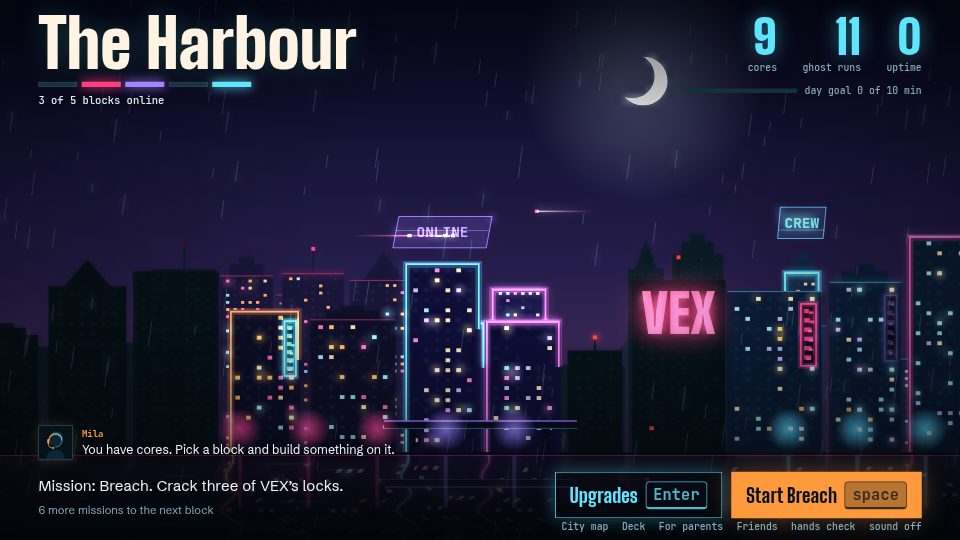
Learn to type while you switch a city back on
In Typcoon: Nightcode, every command your child types switches a piece of a blacked-out city back on. Typing neatly earns the most, so your child learns to touch type without even noticing. Free to try, no account needed.
▶ Play free