About Typcoon
Typcoon is a typing game for kids ages 8 to 14. Your child types a blacked-out city back on, and learns to touch type with all ten fingers along the way. This page explains how the game teaches, who it is for, how we handle data, and who is behind it.
What is Typcoon?
In Typcoon: Nightcode, a rogue AI has switched off an entire city. Every command your child types brings a piece of it back: a street, a bridge, a tower. Typing is the only way to make progress, and typing accurately earns the most. So every minute of play is also a minute of practice.
The game runs in the browser on a laptop, Chromebook or desktop with a real keyboard. There is nothing to install and no account to create: your child can start right away.
How Typcoon teaches: the method
Behind the city sits a learning engine that decides which letters your child practices and for how long. It follows a few fixed principles.
Home row first
Everything starts at the home row: A-S-D-F for the left hand, J-K-L-; for the right, thumbs on the space bar. The whole first district of the city, the Harbour, is built around that row. Only when it feels automatic do the rows above and below come in.
Accuracy before speed
A mistake puts the city's AI on your child's trail, and speed only counts when the typing is accurate. That way your child doesn't bake in errors they would have to unlearn later. Speed comes on its own once the fingers know the way.
Ten minutes a day
Short sessions work better than long ones. After 10 minutes of typing, the game tells your child they are done for today. They can keep playing, but the game never pushes. Skipping a day doesn't wipe out their streak right away: it pauses for a day.
One letter at a time
A new letter only arrives once the previous one has stuck. Letters that are still shaky come back more often; in the game they flicker on screen as glitches that your child fixes by typing them correctly. The next key lights up on the on-screen keyboard in the color of the finger that should press it, so your child keeps looking at the screen instead of the keys.
Your keyboard, your language
Typcoon recognizes the keyboard and adapts the practice to it: US QWERTY, the French and Belgian AZERTY, the German QWERTZ and the Spanish keyboard. A parent can also pick it under For parents → Keyboard; what your child has already learned stays put. The game is available in English, Dutch, French, German and Spanish.
The voice of the crew
Your child is never on their own. Mila, the mentor, talks over the radio, Byte the drone reacts to every keystroke, and each district has its own crew member. When a new key comes up, that crew member explains it in a couple of short, spoken lines in the language of the game. Short enough for an 8-year-old, never babyish for a 14-year-old.
Who is Typcoon for?
- Kids ages 8 to 14 who want to type without looking at the keys, including kids who hunt and peck with two fingers today.
- Parents who want their child to pick up a skill they will use for the rest of their school years, without ads or hidden purchases. The big picture is in our guide Typing for Kids; the technique itself, with a finger chart, is in Touch Typing for Kids.
- Schools: students sign in with their own code and the teacher sees how each child is doing. See Typcoon for schools.
What is free?
The home row and the whole first district of the city, the Harbour, are free, with no time limit and no account. That is a real chapter of learning, not a five-minute trial. The rest of the alphabet (with capitals, punctuation and numbers) and the other five districts sit behind one one-time family unlock. No subscription, no ads, and a child can never buy anything on their own.
Privacy in plain words
- Your child can play without an account. Progress then stays on your own computer.
- No ads, no third-party trackers, no chat and no public profiles.
- We count how the game is used (for example: a mission was finished), without knowing who your child is.
- If a parent wants progress on more than one computer, they can make a parent account: just an email address, and you can delete it yourself.
- The database is in Europe.
Exactly what we keep, why and for how long is in our privacy policy.
Who is behind Typcoon?
Typcoon is made by a small team in the Netherlands. We build the game step by step and adjust it to what we see: where kids get stuck, which letters stay tricky, and what parents and teachers tell us.
Questions, ideas, or found a bug? Email contact@typcoon.com.
Frequently asked questions
Who makes Typcoon?
A small team in the Netherlands. You can reach us at contact@typcoon.com.
Why a game instead of a regular typing course?
Because a kid who enjoys it practices more often and for longer. In Typcoon, typing is the only way to make progress, so playing is practicing. The learning engine takes care of the structure: home row first, one letter at a time, accuracy before speed.
How does Typcoon make money?
Through the one-time family unlock and the school version. Not through ads and not through data. A child can never buy anything on their own.
Does Typcoon work on a tablet or phone?
No. Touch typing is learned on a real keyboard, so Typcoon is played on a laptop, Chromebook or desktop.
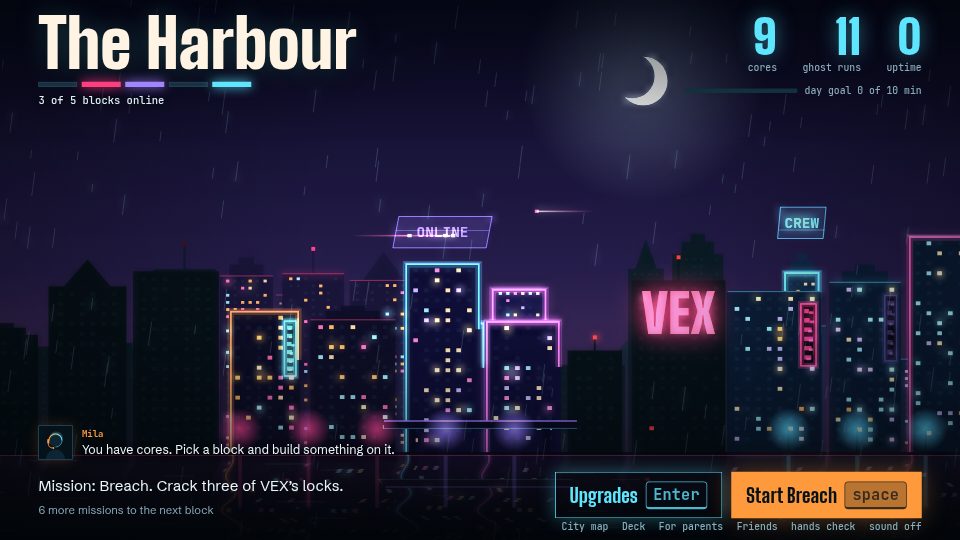
Learn to type while you switch a city back on
In Typcoon: Nightcode, every command your child types switches a piece of a blacked-out city back on. Typing neatly earns the most, so your child learns to touch type without even noticing. Free to try, no account needed.
▶ Play free