Typcoon · touch typing with 10 fingers · 10 min a day

Learn to type with all 10 fingers.

Type the city back on.

Made for kids: every command your kid types switches a piece of the city VEX blacked out back on. Along the way, every finger learns its own keys, without looking.

▶  Play free Free to try · no ads · no in-app purchases for your kid

How it works

Typing is the power switch.

  1. 01

    Ten fingers on the home row

    Your kid starts with their fingers on F and J. Every key has its own finger, and every mission is real touch-typing practice, picked for the letters they are learning.

  2. 02

    The city comes back

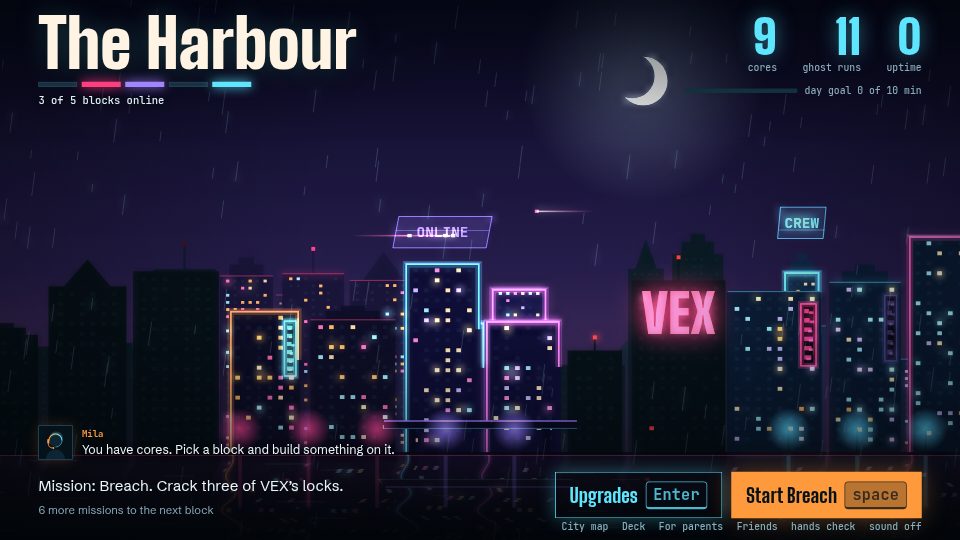
    Blocks switch on, neon flickers, a maglev glides in. The neater you type, the more cores you earn.

  3. 03

    Beat the boss

    Every district ends with a boss. Win, and the next district opens on the city map.

Screenshot of Typcoon: Nightcode: a city at night with a few blocks lit in neon, Mila the mentor on the radio and a mission ready to start.

Six districts

One city. Six worlds.

Why it works

A game first. Real skill underneath.

01 // TYPING

Typing switches it on

Every command your kid types turns on a piece of the city. The neater they type, the more cores they earn to upgrade it.

02 // DISTRICTS

Six districts

From the Harbour to the Grid: every district has its own missions, its own crew member and its own boss. At the very end: VEX itself.

03 // MISSIONS

Missions, not drills

Crack locks, catch drones, race your own ghost, load a ship. Underneath, it's the same careful practice every time, picked for your kid.

04 // DIPLOMA

The Typing Diploma

Exams appear only when your kid is ready, all the way to the Typing Diploma. Failing costs nothing; you simply try again later.

A typing game, not a typing course

Most programs for learning to type are a course with a game bolted on as a reward. Typcoon flips that around: it is a game, a whole city to bring back to life, where typing is the only way to make progress. No shortcuts: whoever types neatly, and gets steadily faster, lights up the most of the city.

For parents: real learning happens here

  • Adaptive curriculum — letters are introduced one at a time, exactly when your kid is ready.
  • Accuracy first — sloppy mashing gets noticed by VEX and earns little; typing neatly is the big lever. Speed follows naturally after.
  • Smart repetition — weak letters and letter combinations come back more often (spaced repetition), so they stick.
  • Instant feedback — on every keystroke, every task. So bad habits never get a chance to set in.
  • A clear stop after 10 minutes — short and daily is how typing sticks. After 10 minutes your kid reaches the day goal (carrying on is allowed, never pushed), and the parent overview shows what they can already do and how much they practise.
  • Privacy-friendly — plays entirely without an account; no third-party tracking, no cookies, no ads — only usage statistics without a name or email address. All progress stays local. An optional parent account (only an email address needed) enables sync and a weekly progress email.

Want to know more about learning touch typing? Read the complete guide: typing for kids — the best age to start, correct finger placement, and how to practice. Or browse all articles.

Frequently asked questions

Is Typcoon free?

Yes, you play for free: the first letters (the home row) and the whole first district, the Harbour, with no account needed. Want the full alphabet and all six districts? There's one one-time family unlock: no subscription, no ads, and never a purchase your child can make on their own.

Does my kid actually learn to touch type here?

Yes. Under the hood runs an adaptive learning engine: letters are introduced one at a time as your kid is ready, weak letters get smart repetition (spaced repetition), and accuracy comes before speed. Typing is the only way to make progress, and typing neatly earns the most: VEX doesn't notice you, and that's worth extra cores to upgrade the city.

How long should my kid play each day?

About 10 minutes a day is enough: short, frequent practice sticks better than one long session. Typcoon marks the moment. After 10 minutes of typing your kid reaches the day goal (they may keep playing, the game never pushes), and the parent overview shows how many minutes they practiced on each day of the week.

What age is Typcoon for?

Typcoon is built for kids roughly 8 to 14 years old, but anyone who wants to learn touch typing can play.

Do I need an account?

No. Your kid starts playing right away; progress stays local in the browser. A parent can optionally link an email (parent account) for progress across devices and a weekly progress email — without a parent account, we never receive a name or email address; we only count usage statistics, not linked to a name, email address or account.

Can Typcoon be played on a tablet?

Typcoon is played with a real keyboard, so on a laptop or computer. That's how your kid learns correct finger placement.
Switch the city on.

▶  Switch the city on